
Updating the UI of a deployed medical device presents a unique engineering challenge: eliminating framework obsolescence without altering the user experience. Recently, a leading manufacturer of diagnostic imaging equipment engaged Cardinal Peak to update the software infrastructure across several established medical devices. The task: modernize the product code base without changing the look, feel, and behavior of the product running the older, soon to be end-of-support (EoS) software.
To the end-user clinicians and doctors, the user interface required behavioral parity. The product needed to maintain pixel and interaction consistency to avoid triggering a clinical retraining protocol, even as the code underneath was completely rebuilt.
Contents
The Regulatory Driver: Why Update an Operationally Stable UI Baseline?
If the user experience and product behavior remain the same, why update the code baseline? Under regulatory standards like IEC 62304, running a commercialized device on an EoS user interface framework can introduce operational and regulatory risk. When a framework reaches EoS, the vendor ceases active security surveillance and patch deployment. Consequently, to satisfy mandatory regulatory audits, the manufacturer must address three core lifecycle vulnerabilities:
1. Proactive Lifecycle Risk Management
When third-party software hits EoS, the device maintenance plan undergoes a fundamental shift from predictable framework updates to unpredictable manual fixes. Without active vendor support, the device manufacturer loses the safety net of a maintained commercial baseline and must absorb the full engineering burden of monitoring upstream security channels, identifying vulnerabilities, and manually backporting fixes into an isolated codebase.
2. Cybersecurity and Continuous Post-Market Surveillance
Under current global regulations, device manufacturers must maintain an active Post-Market Surveillance (PMS) system to track and remediate field vulnerabilities. While running an older framework does not legally mandate an immediate software upgrade, it creates an operational bottleneck: if a defect or vulnerability is discovered within an unpatched component, the manufacturer is required to mitigate the issue which may be prohibitive in an out of date system. Proactively migrating to an active Long-Term Support (LTS) baseline allows the device manufacturer to maintain and add features as required.
3. Mitigating Hardware Obsolescence
Depending on the Medical Device its lifecycle can span up to 15+ years. As device components like CPUs and GPUs evolve, older codebases frequently fail to support driver models or updated chipsets. This can force the manufacturer to stop supporting the product which usually means it can no longer be sold. Modernizing the foundational UI code ensures the software system can adapt to the identified hardware components when the device parts go end of life, or need to be changed.
Navigating Frameworks: Shifting to a Modernized Qt LTS Standard
For our client, what was thought to be a simple version bump turned out to be a fundamental shift in some of the underlying code’s design philosophy, specifically the UI Qt Meta-Object Language (QML) design.
For context, QML is a declarative language used within the Qt framework to build highly fluid, responsive user interfaces. Because it allows developers to define UI elements layout and behavior simultaneously, code built on older versions can quietly depend on ‘silent’ framework behaviors that modern, stricter engines completely reject.
Moving from an early legacy Qt 5.x base to a modernized Qt Long-Term Support (LTS) standard introduces strict QML engine rules and a more refined API. So what started off as a simple upgrade effort, became a QML modernization effort.
While the transition improved performance and stability, it also highlighted the matured QML best practices. Here is a breakdown of the migration hurdles and the architectural shifts encountered.
Layout Architecture: Replacing Imperative Anchor Webs with Declarative Trees
One of the most common architectural shifts when moving to a modernized Qt LTS framework requires transitioning away from standard anchors inside RowLayout or ColumnLayout structures. Anchors and Layouts operate on entirely different philosophies. It’s the difference between absolute positioning (anchors – place exactly 10px from that) and flexbox-style flow (layouts – this item takes up 20% of the remaining space). It is a fundamental shift in how the developer “thinks” in QML.
In medical device environments, the user interface is a safety-critical requirement—as an example: a device display rendering or truncation error cannot be allowed to hide an active patient metric. Statically bound anchors rely on relative, element-to-element positioning that functions effectively for fixed-resolution displays but struggles to isolate layout breaking points. Conversely, structured Layout grids explicitly dictate how UI elements scale and flow across differing target display resolutions, introducing an architectural layer of defense against accidental rendering overlap.
 Moving from the web of arbitrary anchors to the structured flow of Layouts is like moving from free-hand drawing to using a grid—it’s more disciplined, even if it seems too structured. The developer moves from a flat, interconnected web of anchors to a nested hierarchy.
In older Qt 5.x codebases, developers could treat the user interface like a single layer where elements freely attached to one another. In modernized Qt LTS versions, achieving the same visual layout requires a structured nesting doll hierarchy of containers. This shift highlights a fundamental conflict in layout design rules:
- Mix relative anchors inside automated structures on older Qt 5.x engines often resulted in silent tolerances, leading to unpredictable layout degradation when screens resized.
- Modern QtQuick.Layouts are explicitly engineered to manage child component positioning and dimensions automatically.
- Forcing standard anchor links inside a dynamic layout container introduces an immediate structural conflict between competing positioning engines.
- Modern best practices resolve this conflict by completely replacing manual anchors with native, layout-compliant properties like Layout.fillWidth: true, Layout.alignment, or Layout.preferredWidth.
Anchoring: The “Map” Approach
In early Qt 5.x code, the canvas was treated like a map. The first element was anchored to the top-left, then the 5th element could be anchored directly to the right side of that first element, regardless of where elements 2, 3, and 4 were declared in the code.
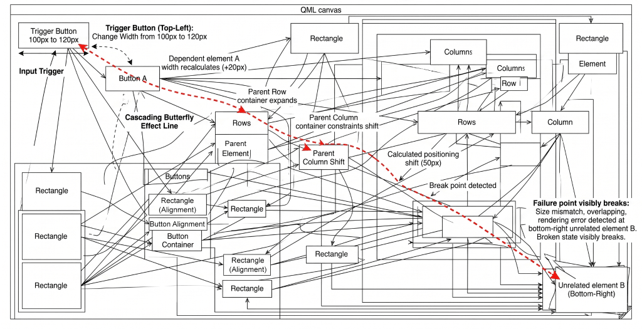
Figure 1 illustrates the cascading butterfly effect line in a QML layout, tracing the dependency trail from the top-left button across the complex, chaotic network. As can seen, the broken state visibly breaks the bottom-right unrelated element, clearly marking the end failure point.
Figure 1. QML Butterfly Cascade: Layout Dependency Breakdown
Layouts: The “Stack” Approach
In modernized Qt LTS versions, RowLayout and ColumnLayout enforce a strict, linear declaration order. The first element declared in the code is the first element placed, and subsequent elements are ordered sequentially relative to their siblings.
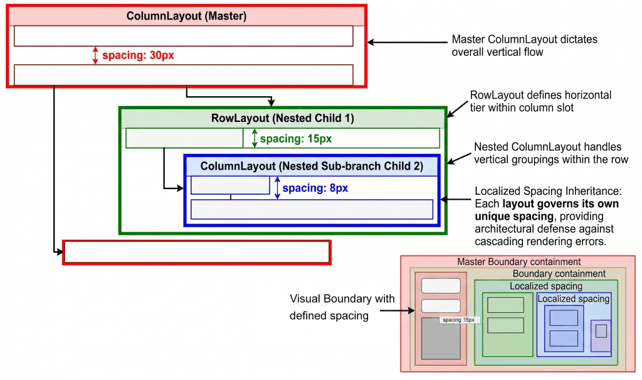
Because developers cannot skip the line to link arbitrary elements, the underlying code hierarchy must strictly mirror the user’s visual screen flow. While this linear restriction can feel rigid initially, it drastically reduces layout complexity. Nesting layouts within layouts has become the modern industry standard for responsive QML design, effectively replacing tangled anchor webs with a highly maintainable, predictable logical tree:
- ColumnLayout Backbone: Explicitly manages the overall vertical stack configuration.
- RowLayout Segments: Integrate directly into column slots to align multiple interface assets side-by-side.
- ColumnLayout Sub-stacks: Nest within row layouts to handle complex vertical groupings inside a horizontal tier.
Figure 2. Visual Boundary Containment & Predictable Localized Spacing (Modern Best Practices)
Localizing Interface Breaking Points
In an anchor-based model, updating the dimensions of a single top-left button can trigger an unintended cascading geometric shift that breaks layout alignment in the bottom-right quadrant of the screen. Grouping items into isolated, nested containers keeps layout adjustments strictly localized. Changes inside a specific row might shift adjacent items, but they cannot corrupt the geometry of unrelated screen regions.
Streamlining Margin and Spacing Management
Older codebases typically require engineers to apply explicit properties like anchors.leftMargin to every standalone asset, increasing code clutter and maintenance overhead. With nested hierarchies, developers define a single, unified spacing property on the parent container, standardizing interface padding across the layout without duplicating property bindings.
Eliminating Alignment and Anchor Conflicts
Nesting layouts removes the temptation to drop conflicting code like anchors.centerIn: parent into objects whose layout is already governed by a container engine. Developers instead utilize standard alignment tags like Layout.alignment: Qt.AlignVCenter, instructing the layout engine to handle vertical centering smoothly alongside neighboring structural elements.
Interface Predictability: Comparative Layout Mechanics
| Feature | Layout Types (RowLayout, etc.) | Positioning (Anchors) |
|---|---|---|
| Ordering | Sequential: Order in code dictates position. | Freeform: Anchors can link any two items. |
| Resizing | Automatic: Uses Layout.fillWidth to grow/shrink. | Manual: Requires binding heights/widths to parent. |
| Runtime Layout Calculations | Dynamic: requires CPU overhead to automatically calculate relative item flow and responsive scaling. | Minimal overhead: positioning is statically bound, offering high efficiency for fixed user interfaces. |
| Spacing | Unified: Set spacing: 10 once for all items. | Individual: Must set margins for every anchor link. |
| Maintenance | Localized changes; low risk to distant elements. | High risk of “cascading” layout breaks. |
| Complexity | Initial overhead for small UIs; scales perfectly for large ones. | Simple for small UIs; nightmare for large ones. |
JavaScript Integration: Transitioning to Explicit QML Signal Handlers
A critical shift in modernized Qt LTS engines is the formal deprecation of legacy signal handler syntax. Previously, the engine utilized a loose onSignalName: { … } style that relied entirely on runtime context property lookups. Under this implicit model, the engine dynamically searched the local scope to resolve variables referenced inside a handler—a convenience that introduced significant architectural risk, ambiguous code execution, and localized performance penalties during runtime lookups.
The updated framework forces a strict transition to standard JavaScript function syntax:
// Legacy Qt 5.x Syntax (Implicit Scope Lookup)
onClicked: {
print(mouseX) // Engine dynamically hunts for mouseX origin at runtime
}
// Modern Qt LTS Syntax (Explicit Parameter Definition)
onClicked(mouse) {
print(mouse.x) // Parameters are explicitly defined in the signature
}
Enforcing this explicit parameter definition alters scope impact across the codebase. Variables are no longer magically discovered by the compiler; instead, any parameters supplied by a signal (such as physical mouse coordinates within an interactive UI zone) must be formally declared within the function signature before execution.
Transitioning from implicit scope tracing to explicit function signatures provides a substantial advantage for medical device software stability:
- Optimized Compilation: Eliminating runtime variable searching allows the QML compiler to optimize underlying machine code execution paths natively.
- Predictable Interface Execution: Utilizing explicit signatures eliminates scope ambiguity, ensuring critical interactive elements cannot break due to unmapped runtime path alterations.
- Maintainable Codebase Parity: Aligning code architectures with standard modern JavaScript structures makes the codebase instantly readable for succeeding engineering teams.
By demanding rigid declaration orders across layout grids and explicit parameter signatures in script handlers, the modern engine yields faster interface responsiveness while building a stable, manageable foundation for long-term product lifecycles.
Conclusion: Building a Defensible Path to Qt 6 Compliance
Upgrading QML to a modern LTS standard represents a distinct transition from an unconstrained sandbox mindset to disciplined software engineering. Redesigning code architecture to align with stricter validation rules ensures that the product’s front-end presentation is as stable as the hardware underneath. The ultimate benefit of this migration is that it mitigates intermediate regulatory risk while positioning the codebase for a future jump to Qt 6 with minimal frictional overhead.
While modernizing the presentation layer resolves immediate front-end obsolescence, the stability of that UI relies entirely on the underlying operating system. See Part 2 of this series to see how we executed the accompanying Board Support Package (BSP) upgrade and consolidated the embedded Linux kernel architecture.
Evaluating a Legacy UI or Firmware Modernization?
Managing post-market regulatory compliance for aging product frameworks can easily strain internal engineering capacity. Cardinal Peak delivers comprehensive embedded expertise from the customer-facing presentation layer down to low-level firmware, drivers, and the OS—to successfully modernize legacy platforms while maintaining complete clinical workflow continuity. Connect with our experts today to request a top-down project ROM delivered within five business days.